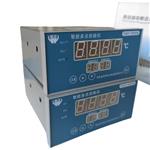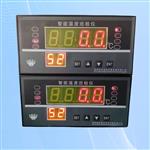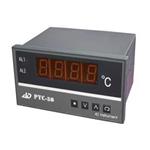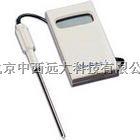

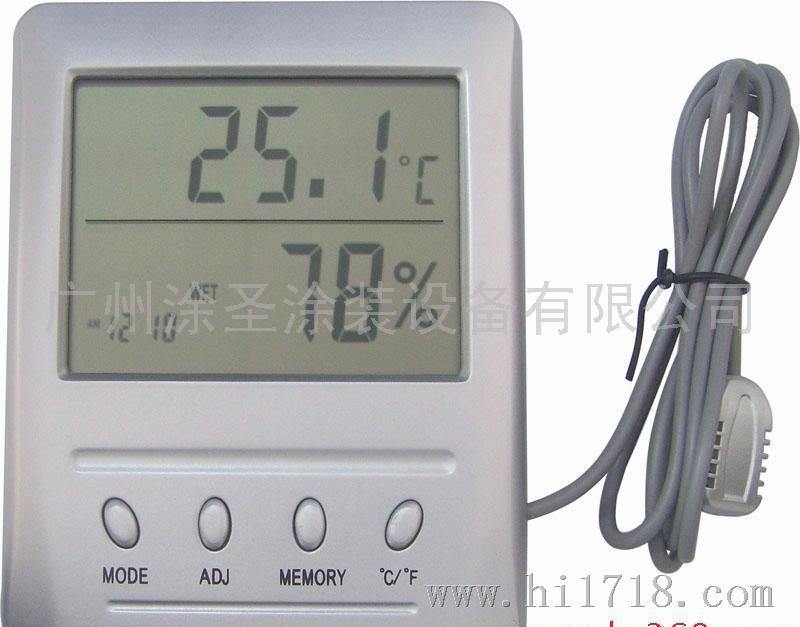


- 產品型號:
- WSB-1/WSB-2
| 基本功能: |
● 溫度、濕度、時鐘顯示 ● ℃/℉溫度顯示 ● 相對濕度及舒適度顯示功能 ● /溫度記憶顯示功能 ● /相對濕度記憶顯示功能 ● 日歷顯示功能 ● 12/24小時制時鐘 |
| 適用環境: | 適用于對溫度及相對濕度有一定要求的環境。如:氣象觀測、實驗室、檔案室、通訊機房、科研、農業及紡織、醫藥、醫院、倉庫、博物館、辦公室及家庭等諸多場所。 |
| 技術參數: |
●溫度測量范圍:WSB-1型 -20℃~+60℃ WSB-2型 -50℃~+70℃(外置傳感器) ●溫度分辨力顯示:0.1℃(0.2℉) ●溫度測量::±1.0℃ ●溫度取樣周期:10秒 ●相對濕度測量范圍:10%RH~99%RH ●相對濕度分辨力:±1%RH ●相對濕度測量:±2%~3%RH(40%RH~80%RH范圍內) |
| 功能描述: |
●初始化 時間:AM 12:00,12小時制 日期:1 1 溫度顯示方式:℃,進行次測溫,并存入記憶中,溫度顯示為室內溫度。 ●按鍵功能 [MODE]鍵:切換時鐘顯示模式,并可設置時鐘。 [ADJ]鍵:調整設置項目的值/顯示日期 [MEMORY]鍵:分別顯示記憶中、溫濕度,并可清除記憶。 [℃/℉下]鍵:切換溫度℃/℉顯示方式 ●按鍵操作 ◆長按[MODE]鍵進入時鐘設置狀態。每按鍵,設置項目分別為;分一小時一12/24一月一日一退出設置 ◆按[ADJ)鍵設置項目加1,按住2秒后以8Hz快速自增。 ◆設置分時,秒清零。 ◆設置月、日時,天數自動調整,1分鐘無按鍵自動退出。 ◆按[MEMORY]鍵,顯示記憶中溫度和相對濕度:再桉IMEMORY)鍵,顯示記憶中溫度和相對濕度:后按[MEMORY]鍵,則返回到當前溫度和濕度顯示。 ◆當在MAX或MIN顯示模式時,若10秒鐘無按鍵,則自動返回當前溫度和相對濕度顯示模式。 ◆按住[MEMORY]鍵2秒鐘,可清除/溫度和相對濕度,此時的/溫度和相對濕度即是當前溫度和相對濕度。 ◆按[℃/℉]鍵可選擇℃或℉或下顯示。 ●舒適度顯示 ◆從“COMFORT”, “WET”, “DRY”這三種顯示可以知道當前所處的環境是否舒適或太濕或太干。 ◆當溫度在20℃~26℃;(68℉~78.8℉)之間,相對濕度在50%RF~70%RF之間時,顯示“COMFORT”(舒適)。 ◆當在任意溫度下,相對濕度高于70%RF時,顯示“WET'’(太濕)。 ◆當在任意溫度下,相對濕度低于50%RF時,顯示“DRY”(太干)。 ◆當溫度低于20℃;(68℉)或高于26℃;(78.8℉),相對濕度在50%RH~70RH%之間時,無舒適度顯示。 注:舒適度值可能因行業原因各有界定,本儀表舒適度顯示僅供參考。 |
| 使用及維護: |
●儀表的溫度和濕度均已調節準確。儀表的時鐘在裝上一節7號電池并校準時間后即可使用。 ●儀表的使用環境應保持潔潔凈,不得有腐蝕性氣體,不能直接接觸水和蒸汽。 ●本儀表為精密儀器,敬請用戶勿自行拆卸,否則可能造成儀表的損壞。 |
| 存儲要求: | 存儲環境須潔凈,溫度要求在-20℃~+60℃之間。 |
| Basic functions: |
·Temperature, humidity and clock display ·Calendar display ·12/24 hours clock ·C/~F temperature display · Relative humidity and comfort display ·Maximum/minimum temperature memory display ·Maximum/minimum relative humidity memory displa |
| Applicable environment: | It is applicable to environment that requires certain temperature and relative humidity, such as laboratory, file room, communication machine room, hospital, warehouse, museum, office and family. |
| Technical parameters: |
·Temperature measurement range: WSB-1 type -20℃~+60℃; ·WSB-2 type -50℃~+70℃ (with external transducer) ·Temperature resolution display: 0.1℃(0.2℉) ·Temperature measurement accuracy: ±1.0℃ ·Temperature sampling period: 10 seconds ·Measurement range of relative humidity: 10%RH~99%RH ·Resolution of relative humidity: ±1%RH ·Measurement accuracyofrelativehumidity: ±2%~3%RH (Within 40%RH~80%RH) |
| Function description: |
·Initialization ime: AM 12:00, 12 hours Date: 1 1 Temperature display mode: ℃, the first temperature measurement is taken and stored in memory, displayed temperature is indoor temperature. ·Key pressing function [MODE] Key: switching clock display mode and setting clock. [ADJ] Key:adjusting set item value/display date. [MEMORY] Key:respectively displaying maximum and minimum temperature and humidity in the memory, cleaning memory. [℃/℉] Key:switching temperature ℃/℉ display mode ·Key pressing operation 1.Entering clock setting condition by pressing [MODE] for a long time. Each time, setting items respective are: Minute→Hour→12/24→Month→Date→Exit Press [ADJ] to add numbers when setting items, and it will increase quickly by itself 2 seconds. When setting minute, second is back to zero. When setting month and date, it will automatically adjust the maximum days, and automatically exit in a minute without pressing any key. It will display the maximum temperature and relative humidity when pressing [MEMORY] one time, pressing it again, it will display the minimum temperature and relative humidity of its memory, and finally pressing it again, it will go back to the current temperature and humidity display. When in MAX or MIN display mode, if there is no key pressing within 10 seconds, it will automatically go back to the current temperature and relative humidity display mode. It will clear the maximum/minimum temperature and relative humidity by pressing [MEMORY] for 2 seconds, and the displayed maximum/minimum temperature and relative humidity are the current temperature and relative humidity. You can choose ℃ or ℉ display by pressing [℃/℉]. · Comfort display Through "COMFORT" , "WET" , "DRY" , you can learn that whether the current environment herein is comfortable or wet or dry. When temperature is between 20℃ and 26℃ ( 68℉~78.8℉ ) , and relative humidity is between 50%RH and 70%RH, it will display "COMFORT" . Under any temperature, when the relative humidity is higher than 70%RH, it will display "WET" . Under any temperature, when the relative humidity is lower than 50%RH, it will display "DRY". When the temperature is lower than 20℃(68℉) or higher than 26℃ ( 78.8℉) , and the relative humidity between 50%RH and 70%RH, there is no comfort display. Note: The comfort display is for reference only. |
| Application and maintenanee: |
The temperature and humidity of the instrument have been adjusted well. After fitting batteries into the clock of the instrument and adjusting the time, it can be used. The operating environment should be clean, the corrosive gas is not allowed, and it cannot contact water and vapor directly. This is a precise instrument. Please do not disassemble without approval, or it will cause the damage. |
| Storage requirement: |
The storage environment must be clean, and the temperature must between -20℃ and +60℃. |